
Looking for the best way to deliver photos to your clients?
Between WeTransfer, Dropbox, Google Drive, and dozens of online photo gallery solutions, it's hard to know what really works for your photography business.
Yet, a well-chosen and well-used photo gallery can radically transform your workflow:
- a professional delivery tool
- a way to have clients choose final photos
- an additional sales lever
- significant time savings on post-production
- a direct extension of your brand identity
Whether you do weddings, portraits, family, or corporate photography, galleries play a central role in your photographer workflow.
In this complete guide, you'll discover:
- what a professional photo gallery really is (spoiler: it's not just a shared folder)
- different uses based on your photography type and business model
- how to choose between direct delivery, pre-retouch selection, online sales, or IPS
- mistakes to avoid that can hurt your sales
- how to integrate galleries into your overall workflow
1. What is an Online Photo Gallery for Photographers?
A photo gallery is an online space dedicated to your clients, allowing you to:
- present your photos professionally
- organize a session or event
- enable image selection
- authorize downloads (free or paid)
- sell photos or products
- control access and availability duration
Unlike a simple shared folder, a gallery is designed for client experience, showcasing your work, and very often, sales.
2. Why Use a Professional Photo Gallery Instead of WeTransfer or Google Drive?
WeTransfer, Google Drive, or Dropbox can work in a pinch, but they're not designed for your profession.
With a professional photo gallery, you win on all fronts.
Better Client Experience
Your clients access their photos through a clear, aesthetic, and smooth interface, on mobile and desktop.
More Professional Image
You're not delivering files.
You're delivering an experience, consistent with your positioning.
More Control
- protected access
- defined availability duration
- resolution choice
- download enabled or disabled
Sales Opportunities
A gallery can integrate:
- additional photo purchases
- prints
- packages
- post-session options
Real Time Savings
Fewer email exchanges, fewer files to resend, less confusion.
At a Glance
| Criteria | WeTransfer / Drive | Pro Photo Gallery |
|---|---|---|
| Smooth client experience | ❌ | ✅ |
| Photo showcase | ❌ | ✅ |
| Photo selection | ❌ | ✅ |
| Integrated sales | ❌ | ✅ |
| Customization / Branding | ❌ | ✅ |
| Tracking and control | ❌ | ✅ |
3. How to Use a Photo Gallery Based on Your Photography Type
There's no single way to use a gallery.
Depending on your photography type and business model, the gallery can serve very different roles.
1. Final Delivery Gallery
Very common in weddings, events, or reportage.
- you deliver a final selection
- the client downloads the photos
- the gallery serves as a showcase and archive
Simple, effective, experience-oriented.
A smooth client gallery doesn’t depend only on the tool you use, but also on the files you upload to it. Image size, perceived quality and download comfort have a direct impact on the client experience. We go deeper into this topic in a dedicated article on how to optimize photos before sending them to a gallery.
2. Included Photo Selection Gallery
Widely used in portrait, family, maternity, newborn…
Example:
- the session includes 5 retouched photos
- the client accesses a selection gallery
- they choose their 5 favorite images
- they can purchase additional ones if desired
The gallery then becomes a decision tool, and often an upsell lever.
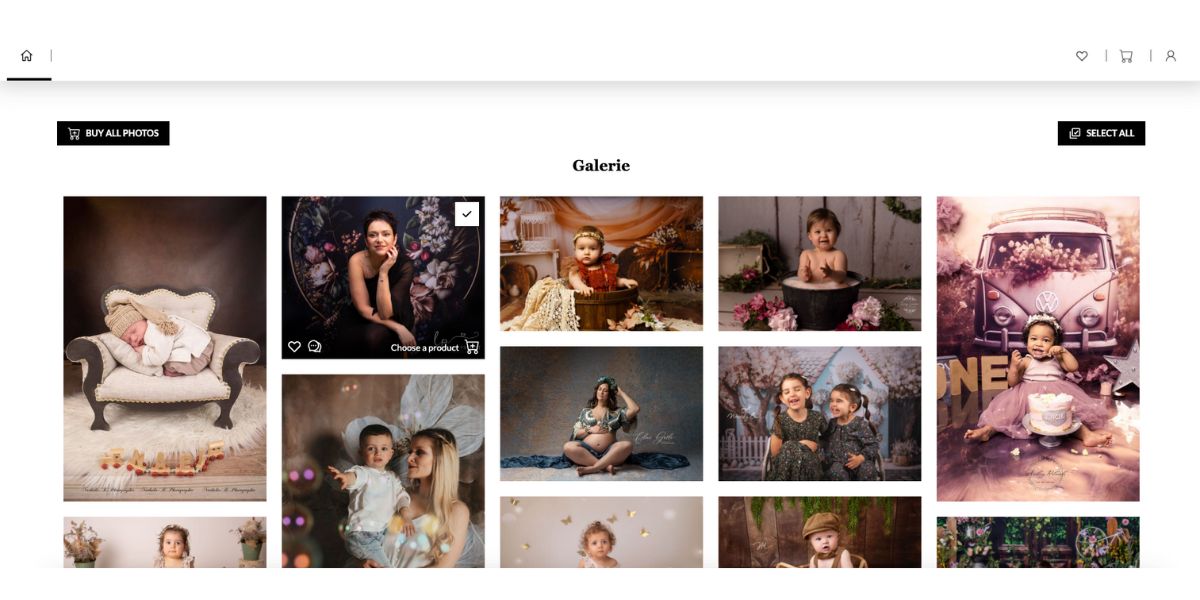
Example of client photo gallery: a clear and personalized space to present photos, make choices, and if needed, purchase additional images or options.
Many photographers also wonder whether they should use watermarks in their online photo galleries, especially to protect their work from theft or unauthorized sharing. However, with the rise of AI, watermarks are no longer the protection they once seemed to be. Their role has evolved: today, they are more about framing a selection stage than truly securing an image. We’ve taken the time to analyze when watermarks make sense, when they become counterproductive for the client experience, and what modern workflow alternatives exist in a dedicated article about using watermarks in photo galleries.
3. Gallery as Additional Sales Lever
Some galleries are designed to:
- sell additional photos
- offer packages
- trigger post-session purchases
- increase average cart without sales pressure
When done right, the sale happens naturally, at the right time.
👉 We detail all of this in this article dedicated to client photo selection, with concrete examples and real cases.
4. Pre-Retouch Photo Selection Gallery
Some photographers work differently:
- they show a wide selection (raw or lightly edited photos)
- the client chooses images to retouch
- the photographer only works on actually sold photos
Advantages:
- less time spent on post-production
- more profitable workflow
But this model requires real consideration:
- unretouched photos showcase your work less
- emotional impact may be weaker
- risk of selling less if the gallery is poorly presented
👉 The gallery then becomes a strategic choice, not just a technical tool.
4. Why Customizing Your Photo Galleries Strengthens Your Photographer Brand
A photo gallery isn't neutral.
It's often the first post-session contact between your client and your universe.
When a client opens their gallery, they should immediately feel:
- your style
- your positioning
- your quality level
- the session atmosphere
A generic gallery breaks this continuity.
It gives the impression of leaving your universe to enter an impersonal tool.
Conversely, a customized gallery:
- extends the experience lived during the session
- builds trust
- showcases your work
- facilitates purchase decisions
Customization isn't limited to adding a logo.
It also goes through:
- colors
- spacing
- photo size
- visual rhythm
- how images are showcased
A good gallery should be technically invisible, leaving all the space for emotion and imagery.
5. Essential Features of a Professional Photo Gallery
Whatever your model, a professional gallery must offer:
- polished and responsive design
- clear navigation (albums, favorites, selection)
- fast loading
- solid security (password, expiration)
- precise download control
- simple management for you
- smooth experience for the client
The question of a gallery’s availability duration is often underestimated. Yet keeping a gallery online for 30 days, 3 months, or a full year doesn’t have the same impact on your sales, your organization, or your client experience. We explored the different approaches, along with their advantages and trade-offs, in this dedicated article on how long to keep a photo gallery online.
The gallery should serve your workflow, not complicate it.
6. How to Organize Your Photo Galleries to Improve Client Experience
An effective gallery isn't just a pile of photos.
A few simple principles:
- structure the session (moments, looks, atmospheres)
- avoid overloaded galleries
- clearly name sections
- use a strong cover image
- guide the client (selection, download, purchase)
👉 To know exactly how many photos to present and how to build a coherent selection, check out our complete guide on photo culling and selection.
The clearer it is for your client, the less time you spend explaining.
7. Free or Paid Download: Which Model to Choose for Your Galleries?
There's no universal answer.
Included Download
- reassuring for the client
- common for certain services (weddings, events)
Paid or Limited Download
- very effective in portrait and corporate
- reinforces perceived value
- enables a real post-session sales model
What matters is consistency between your offer, your communication, and your gallery.
8. Online Photo Galleries vs In-Person Sales (IPS): Do You Have to Choose?
Many photographers are reluctant to use online galleries.
And it's not without reason.
Some work primarily with In-Person Sales (IPS):
- the client comes back to the studio
- photos are revealed on a big screen
- the photographer guides the choice
- products are sold on the spot
This model works very well, especially for:
- portraits
- families
- newborns
- premium offerings
IPS enables:
- strong emotional impact
- personalized guidance
- often higher average orders
But it also has its limits:
- requires more time
- requires physical presence
- doesn't always capture late purchases
- offers little post-session follow-up
Online galleries aren't necessarily the opposite of IPS.
They can instead complement it intelligently:
- pre-selection before viewing session
- post-IPS access to complete an order
- cold additional sales
- clean image archiving
- client experience continuity
👉 It's not about choosing gallery or IPS,
but defining the client journey most consistent with your positioning.
These questions are coming up more and more among photographers, especially with the rise of AI and the growing doubts around online selection galleries.
We took the time to explore real-world feedback, the benefits and the limitations of in-person sales sessions (IPS), as well as how they can complement online galleries, in a dedicated article about in-person sales (IPS) and photo galleries.
9. 5 Mistakes to Avoid with Your Photographer Photo Galleries
- using a gallery only as a folder
- sending too many photos without structure
- not explaining how it works to the client
- mixing selection, delivery, and sales without clarity
- underestimating the impact of presentation
A poorly designed gallery can hurt your sales.
A well-designed gallery can boost them without additional effort.
10. How to Choose the Best Photo Gallery Software for Photographers
Before choosing a tool, ask yourself the right questions:
- do I want to sell after the session?
- do my clients need to choose photos?
- do I want to limit my retouching time?
- do I want a standalone tool or one integrated into my workflow (contracts, quotes, payments)?
The best gallery is one that adapts to your way of working, not the other way around.
If you're deciding between Pixieset and Pic-Time, the two most popular platforms among photographers, check out our detailed Pixieset vs Pic-Time comparison to choose based on your photography type and market.
11. And After the Gallery?
Once the gallery is delivered, downloaded, or used for selection, many photographers move on.
The session is over.
The photos are sent.
The client is happy.
And then… nothing.
In most cases, the relationship stops there.
Not for lack of desire, but because everything is done one-off:
- one client = one session
- one session = one gallery
- then start from scratch next time
Yet, it's often after the gallery that the next chapter unfolds:
- a new session a few months later
- a referral to someone close
- a return for another type of service
- or simply the client thinking of you spontaneously
So the question isn't just:
"How do I deliver my photos?"
But also:
"How do I maintain continuity with my clients over time?"
🔄 The Real Client Journey of a Photographer

Typical photographer client journey: with a gallery alone, the relationship often stops after delivery. When the gallery is part of an ongoing relationship, follow-up and referrals become natural.
👉 A gallery alone handles the central part of the journey very well.
👉 But without follow-up, each relationship often starts from scratch.
Building a Relationship, Not Just Delivering Photos
Having simple follow-up allows for example:
- keeping session history
- knowing when to contact a client again
- proposing a new session at the right time
- staying consistent in the relationship
- not treating each client like a stranger
It's not about "sales at all costs,"
but about continuity and simplicity.
Where Fotostudio Goes Further
With Fotostudio, the gallery doesn't live alone.
It naturally fits into your complete photographer workflow:
- first contact: quotes and contracts
- preparation: session organization
- delivery: galleries and selection
- sales: payments and invoicing
- follow-up: client history and reminders
You easily find a client's history, see their past sessions, can follow up without starting from scratch, build a long-term relationship.
Whether you deliver final photos, have clients choose images, or sell after the session, the gallery becomes a logical building block of your business, not an added constraint.
No jargon. No unnecessary complexity.
Just a smoother way to manage your photography business, from first contact to future sessions.
Conclusion: Why Photo Galleries Have Become Essential for Photographers
Photo galleries for photographers are no longer just for delivering photos.
They can:
- improve your professional image
- simplify your workflow
- help choose final images
- reduce your post-production time
- increase your revenue
When well used, they become a true strategic tool.
Ready to Transform How You Deliver Your Photos?
Discover how Fotostudio can help you manage your galleries, sales, and entire photographer workflow in one tool.
Try for FreeNo credit card required • 2 months free trial


